

Resident Passports are customizable, plastic cards that can be printed for residents or employees of your building and used for a variety of situations. If you have the Resident ID mobile module enabled, they can also be displayed via the resident app instead of or in addition to being printed.
Note: Click on the images to enlarge them.
Table of Contents
- What are Resident Passports?
- What can I use Resident Passports for?
- How do I design my Resident Passport cards?
- How do I print my Resident Passport cards?
- Tell me more about Card Printing!
- How much does Printing cost?
- What data can I put on my Resident Passports?
- How does the CardLink printing program get the data for printing each card?
- Can resident passports be displayed via the Resident App?
- How are move ins/outs handled with Resident Passports?
- How can I use Resident Passports with my access control system?
- Card Printers and Supplies
- Supported CardLink Printers
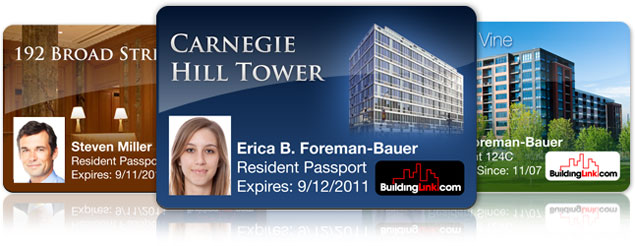
What are Resident Passports?
Resident passports are attractive laminated plastic cards (30-mil thickness) that display information and graphics of your choosing about your building and your individual residents. If you have the Resident ID mobile module enabled, resident passports can be fully electronic and do not need to be printed. They can simply be displayed via the resident app when a resident taps on the Resident ID module.
What can I use Resident Passports for?
Resident Passports can be used in many creative ways:
- Resident ID Cards
- Pool Passes
- Gym/Fitness Center Passes
- “Perk” cards (for participation in negotiated discount programs for local area vendors)
- Employee ID Cards
How do I design my Resident Passport cards?
Our graphics department will work with you to incorporate your preferences, images, colors, and desired data fields. We will design a card template based on your instructions, then submit it for your approval prior to printing.
How do I print my Resident Passport cards?
Passports can be printed locally at your building on one of several ID-card printers we support (click here for a list of printers).
Tell me more about Card Printing!
You just need to download (at no charge) our proprietary “CardLink by BuildingLink” software, which talks to your BuildingLink database and printer and makes printing simple and quick. By printing the cards on-site at your building, management gains greater control and serviceability, and residents can receive their cards immediately upon moving in or signing a lease.
How much does Printing cost?
The software to print locally and the professional design of your cards come at no additional cost to BuildingLink subscribers. There is a one-time cost in purchasing a quality laminate card printer ($2,500 - $5,000, depending on the model), as well as the purchase of your own printing supplies (blank cards and printer ribbons). This breaks down to a printing cost of around $1/card which greatly reduces per-card costs and adds considerable convenience. Supplies can be obtained through our recommended vendor, Idesco. Idesco provides a discount to BuildingLink customers and can be reached at Phone: 800-336-1383 or https://www.idesco.com/.
What data can I put on my Resident Passports?
You can choose from the following elements:
- Building name
- Building photo and/or logo
- Background image
- Resident name
- Resident apt/unit#
- Resident photo
- Lease expiration date
- The words “Resident Passport” or any other static text
- Address and contact info for building or management company (typically placed on the back side)
- Resident-specific barcode identifier (typically placed on the back side)
How does the CardLink printing program get the data for printing each card?
Our card printing program gets the data for printing each of your cards directly from your BuildingLink database. Remember that we can only print pieces of information stored in your site, so if your card design includes things like resident photos, move-in dates, lease expiration dates, or owner/sublet /board member statuses, you'll need to make sure to enter or upload that information into BuildingLink.
Can resident passports be displayed via the Resident App?
Yes! If your property has both Resident Passports and the Resident ID mobile module enabled, residents can display their resident passport by tapping on the Resident ID module inside the BuildingLink Resident App.
How are move ins/outs handled with Resident Passports?
When a new resident moves in, and all required data is saved in their BuildingLink profile, the CardLink program automatically generates a new card for them and places it in the print queue. Once residents move out and are deactivated in the BuildingLink database, their cards are automatically deactivated as well.
How can I use Resident Passports with my access control system?
If your building has an access control system that utilizes RFID “proxcards” or “smartcards,” you can usually obtain blank cards. You can then print your Resident Passports for each individual onto the blank prox cards assigned to them. For properties that have an access control system based on barcodes, or on encoded magnetic stripe IDs, the CardLink program supports both barcode printing and magnetic swipe encoding.
Card Printers and Supplies
Idesco Corporation is our supplier for card printers and supplies. If you mention the printer is for BuildingLink, Idesco will offer a discount.
Idesco Corporation
37 W 26th St 10th Fl
New York, NY 10010
Phone: 800-336-1383
https://www.idesco.com/contact_us/
Supported CardLink Printers
Due to the program coding, CardLink will only work with the printers listed below. A printer capable of double sided printing is required even you are printing a single sided card.
Manufacturer | Model |
Digital Identification Solutions Ag | XID8300 LAN |
Digital Identification Solutions Ag | XID8300 U1 |
Digital Identification Solutions Ag | XID8300 U2 |
Digital Identification Solutions Ag | XID8300 U3 |
Digital Identification Solutions Ag | XID8300 U4 |
Digital Identification Solutions Ag | XID8300 U5 |
Digital Identification Solutions Ag | XID8300 U6 |
Digital Identification Solutions Ag | XID8300 U7 |
Digital Identification Solutions Ag | XID8300 U8 |
Digital Identification Solutions Ag | XID8300 U9 |
Fargo | HDP5000 Card Printer |
Ultra Electronics Card Systems Ltd. | Magicard Pronto (V2) |
Ultra Electronics Card Systems Ltd. | Magicard Rio Pro |
Ultra Electronics Card Systems Ltd. | Magicard Rio Pro (V2) |
Ultra Electronics Card Systems Ltd. | Magicard 600 |