Overview
Once your units and owners are populated, you can make any necessary updates, such as adding an owner to a unit, deleting units/owners, and editing owner information.
Note: Click on the images to enlarge them.
Table of Contents
- Edit Owner Name
- Edit Owner E-voting Agreement, Contact Information, & Alternative Mailing Address
- Add an Owner to a Unit
- Delete an Owner from a Unit
- Delete a Unit
Edit Owner Name
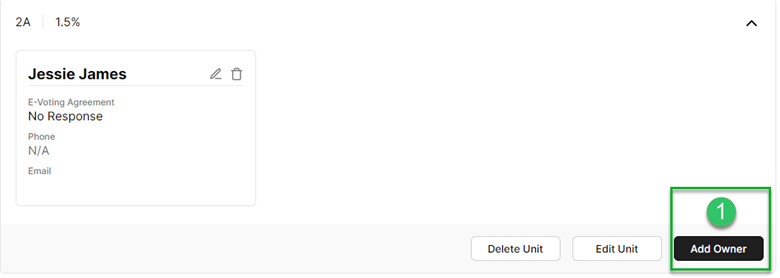
- To edit an owner's name, click "Add Owner" on the appropriate unit.
- Enter the correct owner name and all additional fields on the profile.
- Make the required updates and click "Add."
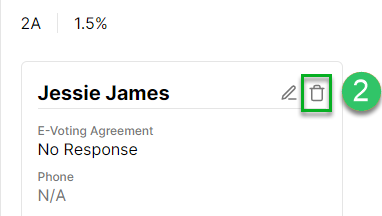
- Click the trash icon on the record with the incorrect name.
Edit Owner E-voting Agreement, Contact Information, & Alternative Mailing Address
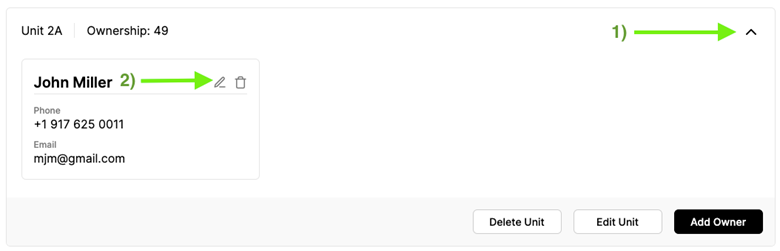
- To edit the owner e-voting agreement, contact information, & alternative mailing address information for a specific unit, click the arrow to the right on the appropriate unit.
- Click the pencil "edit" icon.
- Make the required updates and click "Save."
Add an Owner to a Unit
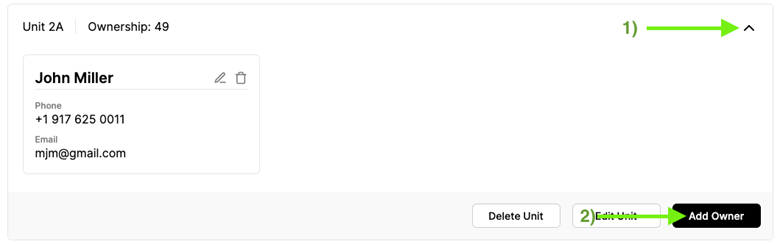
- To add an owner to a specific unit, click the arrow to the right of the appropriate unit.
- Click the pencil "edit" icon.
- Add the additional owner's information and click "Save."
Delete an Owner from a Unit
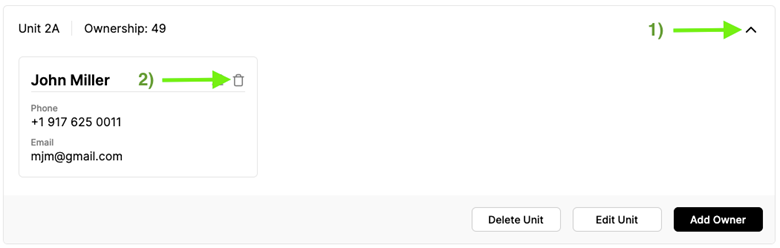
- To delete owner information for a specific unit, click the arrow to the right of the appropriate unit.
- Click the trash bin "delete" icon.
- To confirm, click "Remove."
Delete a Unit
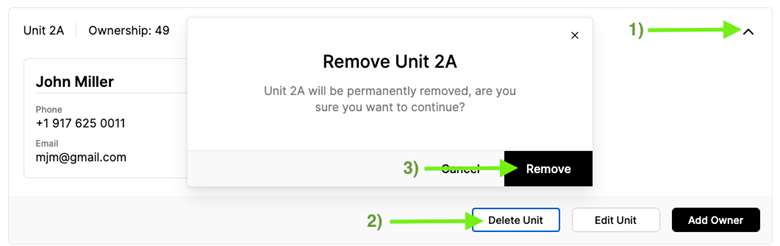
- To delete a unit, click the arrow to the right of the appropriate unit.
- Click "Delete Unit."
- Click "Remove" to confirm.